Scheduler
By Thirdbridge 2018
The problemHigh drop-off rates between initial contact and specialist booking were caused by a disjointed scheduling process, with users relying heavily on consultants to coordinate availability.
Project team
-

Designer
Sole designer for design, research, and UAT.
-

Engineering
Team of four developers varying in skill level. Two senior and two mid level engineers.
-
Other
Working with a scrum master, CTO and the engineering manager.
Early findings
I identified three key user groups within the service: internal staff, clients, and specialists. Through stakeholder interviews and workflow analysis, we found that internal staff acted as the primary communication hub, facilitating around 80% of interactions between clients and specialists.
A major pain point emerged around appointment scheduling. Specialist availability was shared manually through unstructured messages, which internal staff then translated into client-facing emails. This disjointed workflow created significant inefficiencies, leading to frequent back-and-forth communication, delays in booking, and increased administrative effort.
Userflows
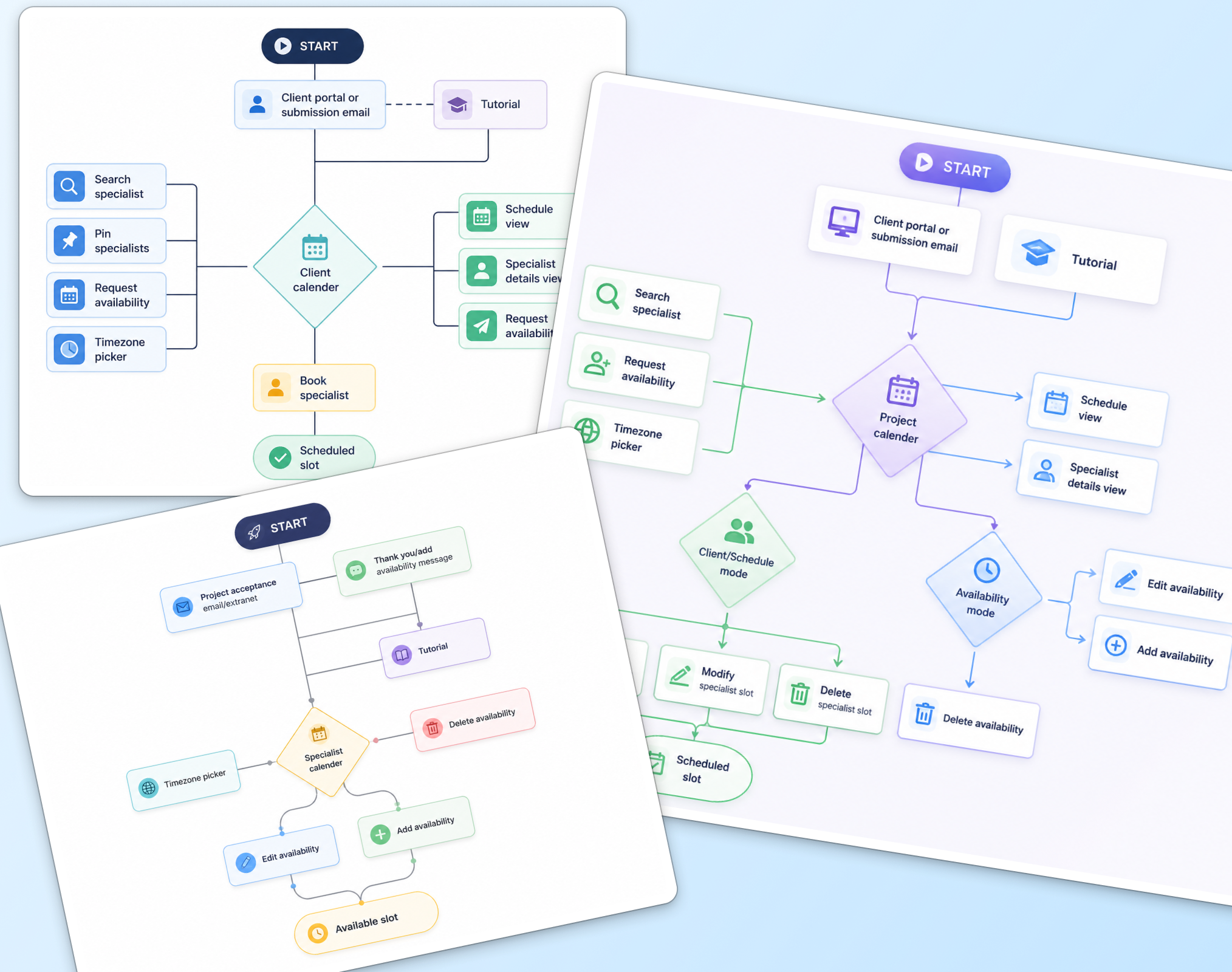
As part of the discovery phase, I created user flows to better understand how each user group interacted with the platform. Through collaborative workshops with users and product owners, we identified three distinct journeys.
Specialists had a focused goal: managing and publishing their availability.
Clients needed a simple way to view and book available time slots.
Internal users required broader functionality, as they needed to support both workflows while also managing additional administrative tasks.
Mapping these flows provided a clear foundation for both the application’s technical architecture and the overall user experience, ensuring the product was structured around the needs of each user group.
Architecture & Design
As the project progressed, workshops helped us align on a single-platform approach instead of separate applications for each user group. A shared interface would be used, with backend permissions controlling feature access based on user roles.
Internal users required elevated permissions, giving them access to both specialist and client functionality, along with additional admin tools. This created a more consistent experience across users while simplifying design and development.
From a design perspective, this meant creating a flexible interface that could adapt to different levels of functionality and data complexity.
Wireframes & testing
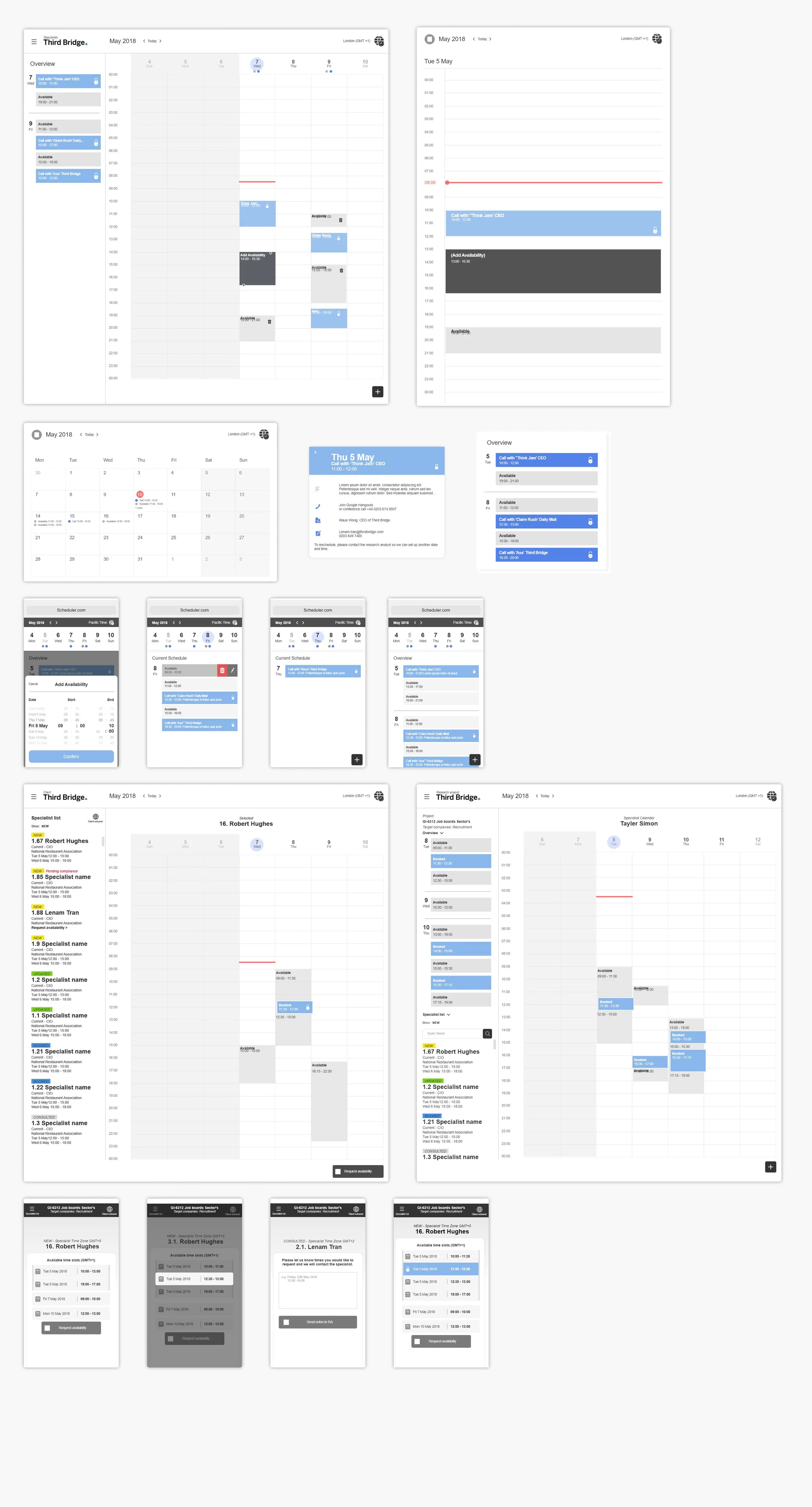
I began the design phase by creating wireframes based on familiar calendar application patterns, building on established usability standards while adapting them to our users’ needs.
I started with the simplest user group, specialists, focusing on the core features needed to manage availability. From there, I expanded the wireframes to support more complex user roles and journeys.
The process was highly iterative, with regular workshops allowing me to gather feedback from users and stakeholders and refine the designs in real time.
Adding new design library
As the project progressed, I developed a design library from the ground up to support both this product and future digital products across the business.
It introduced consistent patterns for components, spacing, typography, and interactions, improving collaboration between design and engineering and enabling a smoother handover.
The system continued to evolve through user testing and stakeholder feedback, driving refinements, component updates, and new features.
Road map
-
MVP/MLP
Add availability in UTC format
Delete availability
Notifications to specialists and consultants
View and select availability as clients
Search and view specialists profile
-
Mid term
Timezone picker
Edit availability
Consultants able to add and book availability
Clients requesting availability
Advance search for specialists
-
Long term
Improve specialist discovery
“Recommended” upsell to both clients and specialists
Calendar integration
Design system implementation